What Is Voice of Customer Service and How to Use It
Learn what Voice of Customer Service is and how to use the raw, unfiltered feedback from support channels to build a product that customers actually want.
Posted by
 Backsy
Related reading
Leveraging AI for Proactive Customer Feedback Collection
Discover how AI can transform customer feedback collection, preventing negative reviews and enhancing satisfaction with strategic insights.
Transforming Customer Feedback Analysis with AI in Real-Time
Discover how AI revolutionizes customer feedback collection and analysis, enabling swift, informed decision-making for businesses.
10 Voice of Customer Examples You Can Actually Use
Stop guessing. See 10 real voice of customer examples from surveys, social media, and support tickets to find out what your customers actually want.
Here's the TL;DR in 20 seconds:
- What it is: Voice of Customer Service (VoCS) is the raw, unfiltered feedback customers give you for free through support tickets, calls, and chats. It’s not a survey. It’s what they’re already screaming at you.
- Why it matters: Your support queue isn't a cost center; it's a 24/7 focus group. Ignoring it is like setting money on fire. The patterns in this feedback tell you exactly what to fix or build next.
- How to use it: Tag every support conversation by theme (bug, feature request, confusion). Quantify the patterns. Pipe those insights directly into your product team's workflow as tickets. Action is the only metric that matters.
What Is Voice of Customer Service
A traditional Voice of Customer (VoC) program is a formal interview. You send a survey. You get polite, structured, often useless answers. People tell you what they think you want to hear.
Voice of customer service is the opposite. It's the candid, off-the-cuff conversation when a customer's hair is on fire and they need help. It's the ultimate source of truth because it’s unprompted. They’re not trying to be nice; they’re trying to solve a problem. They’ll tell you exactly what’s broken, what’s confusing, and what they desperately wish your product could do.
This isn't about closing tickets faster. It's about finding the patterns that inform your roadmap, fix deep-rooted issues, and guide you in building something people don't hate using. For more on the core concepts, read this guide on What Is Voice Of The Customer. A good voice of the customer example shows how this raw feedback translates into powerful business insights.
Key VoCS Data Sources
You don’t need new surveys. These channels are already overflowing with data.
| Data Source | Type of Insight | Why It Matters |
|---|---|---|
| Support Tickets/Emails | Bug reports, usability friction, feature requests | This is your most common source of detailed, written feedback. Easy to search, categorize, and track. |
| Live Chat Transcripts | Real-time confusion, onboarding hurdles | Chats capture frustration the moment it happens, spotlighting flaws in your UX or help docs. |
| Call Transcripts/Recordings | Emotional tone, complex issues, user sentiment | Voice reveals nuance text can’t. You can hear a user’s frustration or delight. |
| In-App Feedback Forms | Contextual issues, specific feature feedback | The feedback is tied to a specific page or feature, giving your devs pinpoint-accurate context. |
- Real Example: A gaming company noticed a spike in support chats from players unable to find a specific in-game item. The chat transcripts showed users were looking in the "Store" tab, but the item was in the "Inventory" tab. The UX team swapped the location. Support chats on that topic dropped 80% overnight.
- Actionable Takeaway: Don’t create more work. Build a system to listen to the work your support team is already doing.
Why Your Support Queue Is a Goldmine of Insights

Most companies treat their customer service team like a fire department—a cost center you call when something’s burning. This is a catastrophic and expensive mistake. Your support queue isn't a liability; it's a live, 24/7 focus group that you're already paying for.
The shift is simple: stop viewing customer service as reactive problem-solving and start treating it as your primary product intelligence engine. Every ticket is a smoke signal. You can either keep putting out individual fires or use the signals to find the source of the blaze.
From Cost Center to Growth Engine
When you reframe your support queue, the dynamic changes. Instead of measuring "time to resolution," you track "recurring issue frequency." You’re not just solving one customer’s problem; you’re gathering evidence to prevent hundreds of future ones.
Failing to listen has real costs. Poor customer service experiences are projected to put $3.8 trillion in global revenue at risk. When customers feel unheard, they don’t just get angry; they leave, and they take their money with them. For a deeper dive, explore these insights about customer service statistics.
A company that sees customer service as a cost will hire cheap, give them a script, and measure them on speed. A company that sees it as an insight engine will hire smart, give them autonomy, and measure them on the quality of the patterns they uncover.
Uncovering Hidden Opportunities
The most valuable feedback isn't about the obvious bug. It's the user who asks, "How do I export this data?" for the tenth time this week, revealing a massive flaw in your UI. These are the insights that don't show up in NPS surveys. They are raw, unsolicited, and brutally honest.
Recurring Issues: The same problem popping up again is a product failure, not a user error.
Feature Requests in Disguise: Customers rarely say, "I need a feature." They say, "I wish I could do X."
Points of Friction: Small annoyances that, compounded, lead to churn.
Real Example: A mid-stage SaaS company noticed customers kept asking how to integrate with a specific accounting software. The product team dismissed it. But the support lead showed that over 40 companies had asked in one quarter. They built the integration. The result? A 15% reduction in churn among their small business segment within six months. The "cost" of support became the direct source of a major retention win.
Actionable Takeaway: Stop viewing your support queue as a list of problems to be solved. See it as a prioritized list of opportunities to be seized.
How to Find the Signal in Your Service Feedback
Your customer service channels are a firehose of data. Most of it is noise. The challenge isn't collecting more feedback; it's finding the sharp signals buried in the mess you already have.
The Manual Analysis Method: Your Tagging Framework
When you're starting out, don't boil the ocean. Manual analysis is your best friend. Create a simple tagging framework inside your help desk to categorize every meaningful conversation.
Don't go crazy. Start with basics that map to the work your teams are doing.
- Bug Report: Something is broken (
bug-login-failure,bug-export-crash). - Feature Request: A customer wants something your product doesn't do yet.
- Usability Confusion: The feature is there, but the user can't find it. A red flag for your UX team.
- Pricing/Billing: Friction related to how customers pay you.
This forces your team to diagnose the root cause, not just apply a band-aid. It turns support reps into frontline product analysts.
Founder's Truth: If you can't manually tag and make sense of 100 pieces of feedback, you have no business trying to automate the analysis of 10,000. Start small, feel the pain, and build a system that works.
Scaling Up with Automated Analysis
Manual tagging works until it doesn't. Once you’re dealing with hundreds of tickets a month, it breaks. You need technology to do the heavy lifting. AI-driven tools plug into your help desk, read for sentiment, pull out topics, and quantify urgent issues without human bias. Learn what is text analytics and how it powers these systems.
| Aspect | Manual Tagging | Automated AI Analysis |
|---|---|---|
| Speed | Slow and laborious. Best for low volume. | Near real-time. Scales to millions of conversations. |
| Consistency | Prone to human error and inconsistent tagging. | Highly consistent based on predefined models. |
| Insight Type | Identifies known issues based on existing tags. | Discovers "unknown unknowns" and emerging trends. |
| Effort | High manual effort from your support team. | Low effort once set up; runs automatically. |
- Real Example: A B2B SaaS company analyzed 10,000 support chats to figure out why new users were dropping off. The AI found a massive cluster of conversations around "project setup." New users were consistently getting stuck on step three of onboarding. This "minor" confusion was impacting 15% of all new users. They redesigned that one screen and saw a 12% increase in successful onboarding completions in a month.
- Actionable Takeaway: Stop guessing what's important. Use a systematic approach—manual or automated—and let customers' problems dictate your priorities.
Turning Insights into Product Action
Collecting feedback that dies in a spreadsheet is a colossal waste of time. Action is the only metric that matters.
This is about building a closed-loop system that pipes raw, quantified customer problems directly into the daily workflows of your product and engineering teams. We're talking about a direct pipeline from a customer support ticket to a prioritized task in Jira.
Creating Your Internal Feedback Loop
An effective feedback loop isn't complex software; it's a disciplined process. It carves out clear channels for insights to flow from the front lines to the people who build the product.
The goal is to make customer feedback visible and unavoidable. This visual breaks down the simple, three-step process.
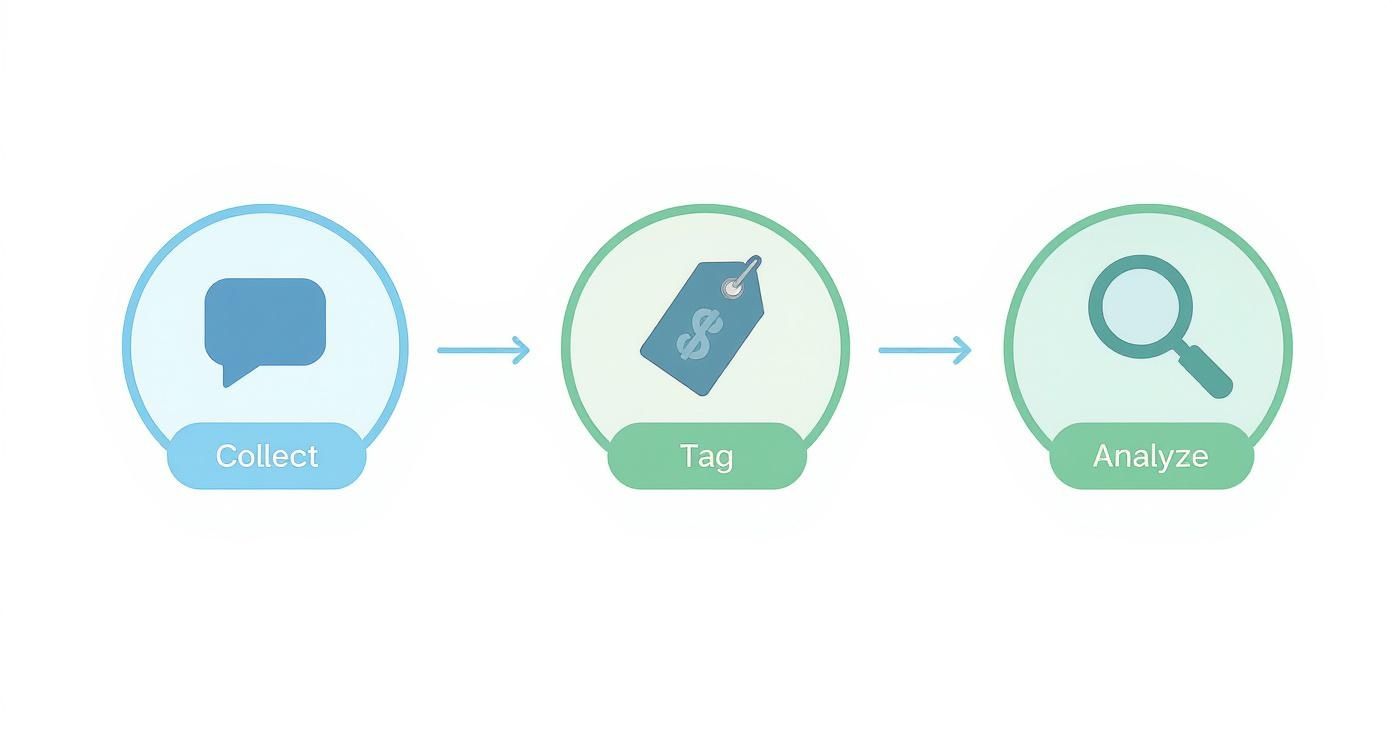
Set up a dedicated Slack channel (#feedback-feed) where your support team posts tagged insights. Then, establish a weekly ritual where product and support leads review top issues and create tickets in Jira or Asana.
The Power of Closing the Loop
The final, most critical step: closing the loop with the customers who gave you the feedback. When your team fixes a bug a user reported, send them a personal email.
This simple act is a loyalty-building superpower. It shows you’re not just listening—you’re acting. In a world where most feedback vanishes into a black hole, being the company that follows up is a massive competitive advantage. With 70% of customers willing to ditch a brand after just two bad experiences, you can’t afford to be passive. You can read the full research on customer experience statistics for more on this.
- Real Example: An e-commerce company selling custom apparel was getting hammered with negative reviews about sizing. The support team started tagging every sizing ticket with specific product SKUs. Each week, they sent a report to the product team: "The 'Classic V-Neck Tee' received 45 sizing complaints this month; 90% said it runs too small." The product team fixed the issue. Then, the support team emailed every single customer who had complained, offering a discount on the corrected item. The result? A 40% reduction in negative reviews within three months.
- Actionable Takeaway: Don’t just collect feedback. Build a system to quantify it, route it to the right people, and notify customers when you’ve fixed their problem.
The Tech Stack for Automating VoCS

Manually reading every support ticket dies the moment your company gets traction. At scale, it’s impossible. Technology is your secret weapon. Building a tech stack for your voice of customer service program is about assembling an automated system that flags critical insights before they become crises.
Core Components of a VoCS Stack
A solid VoCS stack does three things well:
- The System of Record (Your Help Desk): Zendesk, Intercom, Help Scout. These are structured databases of every customer problem. Their APIs are the key.
- The Analysis Engine (The Brains): Dedicated analysis platforms that connect to your data sources and use AI to automatically tag conversations, gauge sentiment, and spot trending topics you’d otherwise miss.
- The Action Layer (Your Project Management): This connects your analysis engine to where your product and engineering teams work—tools like Jira, Asana, or Slack. An insight should automatically create a task.
Here’s what that looks like:
- A customer call gets automatically transcribed using tech like one of the best voice recorders with integrated transcription.
- The transcript is fed into an AI analysis engine. Our guide on the best sentiment analysis tools can help you find the right fit.
- The AI picks up a high-urgency bug.
- It instantly creates a high-priority ticket in Jira, assigns it to the on-call engineer, and fires off a Slack alert.
Founder's Warning: A tool is not a strategy. The value comes from building the plumbing between these systems, so data flows from customer pain straight to engineering action without a human bottleneck.
- Real Example: A fintech app integrated their call transcription software with an AI analysis tool and Jira. The AI detected a spike in calls where users mentioned the words "payment failed" and "error code 502." Within minutes, an alert was sent to the engineering team's Slack, and a Jira ticket was auto-generated with links to the call transcripts. The team fixed the bug before it caused a major outage, all because the system connected the dots automatically.
- Actionable Takeaway: Don’t buy tools, build a system. Automate the flow from customer complaint to developer ticket.
Common Mistakes That Sabotage Your VoCS Program
A Voice of Customer Service program is a power tool—effective in the right hands, dangerous if you don't know what you're doing. A poorly run program just creates noise and convinces your team that listening to customers is a waste of time. Avoid these traps.
Mistake 1: Treating VoCS as a One-Off Project
This is the classic blunder. A team dives into customer data, builds a beautiful report, presents it... and then crickets. The report dies in a forgotten folder.
This "campaign" mindset misses the point. The gold is in the continuous stream of insights. Think of it as a heart rate monitor for your customer experience, not a once-a-year physical.
- Real Example: A subscription box company discovered their number one complaint was confusing delivery tracking. They made a 50-slide deck, but with no owner, the project lost momentum. Six months later, churn was climbing, and "delivery tracking" was still the top complaint.
- Actionable Takeaway: Don't kick off a "VoCS project." Build a VoCS process. It needs to be an automated, ongoing system plugged into how your teams work every week.
Mistake 2: Focusing Only on the Negative Feedback
It’s human nature to zero in on complaints. You have to fix what's broken. But ignoring positive feedback is a huge missed opportunity. Your happiest customers are telling you what your secret sauce is.
When you only listen to the bad stuff, you fly blind on what drives retention. Knowing what makes people cheer is as vital as knowing what makes them churn.
- Real Example: A productivity app obsessed over feedback about its "complex" interface. They spent a year stripping down features, only to watch engagement fall. They had missed the praise from power users who loved those "complex" features. In trying to please the critics, they alienated their biggest fans.
- Actionable Takeaway: Tag and track positive and negative feedback. Celebrate what’s working with the same energy you put into fixing what isn’t.
Mistake 3: Collecting Data Without a Plan for Action
The cardinal sin. You have dashboards and data that clearly show what's wrong. But if that data doesn't trigger a direct, unavoidable action, it's all for nothing.
A Slack channel everyone mutes is not a plan. A spreadsheet a PM looks at "when they have time" is not a plan. Data has to create work.
- Real Example: A SaaS firm's support team diligently tagged every feature request in a shared spreadsheet. The product team was "too busy" with the official roadmap to review it. After a year, a competitor launched, offering the top three features from that exact spreadsheet, and stole 20% of their customer base.
- Actionable Takeaway: Don't just share insights; create tickets. Every important finding must become a prioritized task in Jira or Asana with a name attached. If it’s not a ticket, it’s just talk.
Voice of Customer Service FAQ
Straightforward answers to the questions that keep founders and product managers up at night.
What is the difference between VoC and VoCS?
Traditional Voice of Customer (VoC) is a formal interview—think surveys. You ask for feedback, and you get polite, filtered answers. Voice of Customer Service (VoCS) is candid camera. It's the unsolicited, raw feedback from support channels when a customer is actually having a problem. VoCS is a truer signal of what to fix now.
How can a small startup implement a VoCS program?
Keep it simple. Don't buy a tool. Create a basic tagging system in your help desk (bug-login, feature-request-export). Set aside one hour a week for product, engineering, and support to review the most-tagged issues. The goal is to build the habit of listening, not to achieve perfect data science.
How do you prove the ROI of a VoCS program?
Connect VoCS findings to numbers the business already cares about: revenue, churn, operational costs. Frame wins like this: "By fixing the top bug from support tickets, we cut related ticket volume by 70% and saw a 5% drop in churn among impacted users." Tie your work directly to money.
What is the best way to share insights with other teams?
Stop sending raw data. Tell quantified stories. "Some users are confused" is ignorable. "This month, 42 paying customers couldn't find the export button, which created 15 support tickets" is not. Then, feed these quantified insights directly into the tools your product teams already use, like Jira or Asana, as new tickets.
If you’ve got more than 20 open-ended responses, stop suffering—Backsy.ai scores them in minutes.
