Qualitative Research Coding: From Manual Grind to AI Insights
Master qualitative research coding with a battle-tested guide. Move from tedious manual methods to smart AI analysis and find the insights that matter.
Posted by
 Backsy
Related reading
The 12 Best Tools for Product Managers in 2025 (The No-BS List)
Stop guessing. Here are the 12 best tools for product managers, from roadmapping to feedback analysis. Cut through the noise and find your perfect PM stack.
12 Best Qualitative Analysis Software Tools (2025 Showdown)
Stop drowning in feedback. Discover the 12 best qualitative analysis software tools to code, theme, and analyze customer data—without the manual grunt work.
Your Customers Are Telling You How to Beat Your Competitors, but You're Not Listening
What is text analytics? A blunt guide for founders on turning messy customer feedback into a data-driven roadmap for growth and revenue.
Here’s the TL;DR in 20 seconds:
- What it is: A systematic way to tag raw text (reviews, interviews) to find patterns.
- The goal: Turn messy words into a handful of clear, actionable insights.
- How you start: Choose an approach—start from scratch (inductive) or with a plan (deductive).
- The key tool: A "codebook"—a rulebook that defines every tag to keep your analysis consistent.
- The modern way: Use AI to do the first 80% of the grunt work, saving you weeks of manual effort.
Why Coding Unlocks the Real Voice of Your Customer
Qualitative research coding is the bridge between collecting raw feedback and making smart decisions. Without it, you’re just gathering opinions. With it, you're mining for gold.
The goal isn't just to slap labels on things. It's about systematically breaking down hundreds of comments to build an evidence-backed story about what your customers truly think.
This discipline forces you to step back from your own assumptions. It’s easy to fixate on one loud complaint and mistake it for a trend. Coding makes you look at the entire picture. It’s the difference between guessing your users’ biggest frustrations and knowing with data to prove it. This clarity helps you prioritize roadmaps and refine marketing. We get into the nitty-gritty of this in our guide on how to analyse qualitative data.
To get started, you need to pick your poison. It boils down to three core methods.
The 3 Core Coding Approaches
Don't let the academic terms intimidate you. Choosing an approach is about what you’re trying to achieve.
| Coding Approach | What You Actually Do | When to Use It |
|---|---|---|
| Inductive Coding (Open Coding) | Start with a blank slate. Read the data first and create codes based on what emerges. | You have no idea what to expect. Perfect for discovery research or exploring a new market. |
| Deductive Coding (A Priori Coding) | Start with a predefined list of codes based on existing theories or specific questions. | You're testing a hypothesis. Ideal for validating specific features or tracking known issues. |
| Hybrid Coding | A mix of both. Start with some known codes but stay open to creating new ones for unexpected themes. | The most practical, real-world approach for most projects. It balances focus with discovery. |
Actionable Takeaway: Use Inductive for discovery ("what are the problems?"), Deductive for validation ("is this specific thing a problem?"), and Hybrid for everything else.
Choosing Your Strategy: Inductive vs. Deductive
This is your first big fork in the road. Do you start with a blank slate, or do you come prepared with a map? This isn't academic—it's about picking the right tool for the job.
Inductive coding is the blank slate. You dive into the data with no preconceived notions, letting the patterns emerge on their own. This is your go-to when you genuinely don't know what you don't know.
Deductive coding is your map. You begin with a predefined list of codes you're specifically hunting for. This method is all about validation. You already have a hypothesis—"customers are churning because our billing page is confusing"—and you're combing through the data to prove or disprove it.
Example: A Startup Pivot
I advised a B2B SaaS startup conducting their first user interviews. They had an idea for a project management tool but were fuzzy on the core pain point.
They wisely chose an inductive approach. They sat down with 15 transcripts and started tagging interesting phrases without a framework. They expected codes like "task tracking." But a surprising pattern emerged. Junior employees kept bringing up the convoluted spreadsheets they used just to report their progress upwards to managers.
This discovery became a core pillar of their product.
Six months later, they surveyed their first 500 users. Now, they had a different question: "How many users are using the 'Status Reporting' feature?" For this, they switched to a deductive approach. They built a codebook before looking at the responses, with codes like:
- Status Reporting - Positive
- Status Reporting - Negative
- Feature Request - Reporting
They weren't exploring anymore; they were measuring.
The Rise of Hybrid
In practice, you’ll rarely stick to one method. Most experienced researchers use a mix. You might start deductively, looking for known issues, but stay flexible enough to create new inductive codes when customers throw you a curveball. By 2023, 45% of qualitative research projects included hybrid elements, a massive jump from just 15% in 2015. You can explore more on these research trends.
This visual shows how inductive coding builds a theory from the ground up.
As the diagram shows, it’s a cyclical process. You move from raw data to concepts and categories, which ultimately inform your theory. It’s a true bottom-up approach.
Actionable Takeaway: Don't get married to one approach. Use inductive coding when you need to discover what the real problems are. Switch to deductive coding when you need to measure the impact of a known problem.
Building Your Codebook: The Blueprint for Analysis
Your codebook is the single source of truth for your analysis. Without a solid one, your analysis will devolve into chaos, with different team members interpreting the same feedback in wildly different ways. A strong codebook is the only way to guarantee consistency.
It's the blueprint for a house. You wouldn't let two builders start on opposite ends of a foundation without a shared plan. Before you start coding, it’s a good idea to ground your approach in a solid structure, much like you would when looking at different conceptual framework examples to organize your thinking.
The Anatomy of a Bulletproof Codebook
A functional codebook needs three non-negotiable columns:
- Code: The short, descriptive label (e.g., "UI Confusion").
- Definition: A crystal-clear explanation of what the code means.
- Inclusion/Exclusion Criteria: Specific examples of what does and does not get this code. This is your secret weapon against ambiguity.
| Code | Full Definition | Example of When to Use |
|---|---|---|
| Feature Request - Export | User explicitly asks for the ability to export their data in a specific format (e.g., CSV, PDF, XLS). | "I really wish I could download my monthly report as a PDF." |
| Billing Issue - Overage Charge | User expresses surprise or frustration about being charged for exceeding their plan limits. | "Why was my bill $50 higher this month? I didn't authorize that." |
| Positive UX - Onboarding | User specifically praises the ease, speed, or clarity of the initial setup and tutorial process. | "Getting started was a breeze, I was up and running in 5 minutes." |
Example: A Painful Lesson in Vague Coding
I learned this the hard way on a project analyzing mobile app reviews. We had two researchers coding thousands of reviews, and one of our codes was simply "Buggy."
It was a disaster.
One researcher used "Buggy" for major, app-crashing failures. The other used it for minor visual glitches. When we analyzed the data, the "Buggy" category was a contaminated mess of critical failures and trivial annoyances. The dataset was useless. We had to throw out two weeks of work and start over.
How to Build and Test Your Codebook
Building a codebook is an iterative process. This is a critical part of the overall process of coding data for qualitative research.
- Initial Pass: Read a small, random sample of your data (10-15%). Get a feel for the topics.
- Draft Codes: Create a V1 codebook. Write down potential codes and definitions.
- Test and Refine: Have two different people independently code the exact same data sample using your draft codebook.
- Hunt for Discrepancies: Where did they disagree? Those disagreements are gold—they show you where your codebook is weak. Talk through every disagreement and refine the definitions.
- Iterate: Repeat steps 3 and 4 until your two coders are reaching a high level of agreement (typically 80% or more).
This process feels slow upfront, but it prevents the catastrophe of realizing your definitions were flawed after you've already coded thousands of responses.
Actionable Takeaway: Treat your codebook like a product feature. Draft it, test it with real users (your researchers), find the failure points, and iterate until it's bulletproof.
A Battle-Tested Workflow for Manual Coding
So, you have your codebook. Now for the real work. With a proven workflow, you can turn what feels like a chaotic art into a repeatable science. This isn't about slapping tags on text. It’s a phased approach to peel back the layers of your data.
This process starts with your codebook—an iterative loop of reading, drafting, defining, and refining.
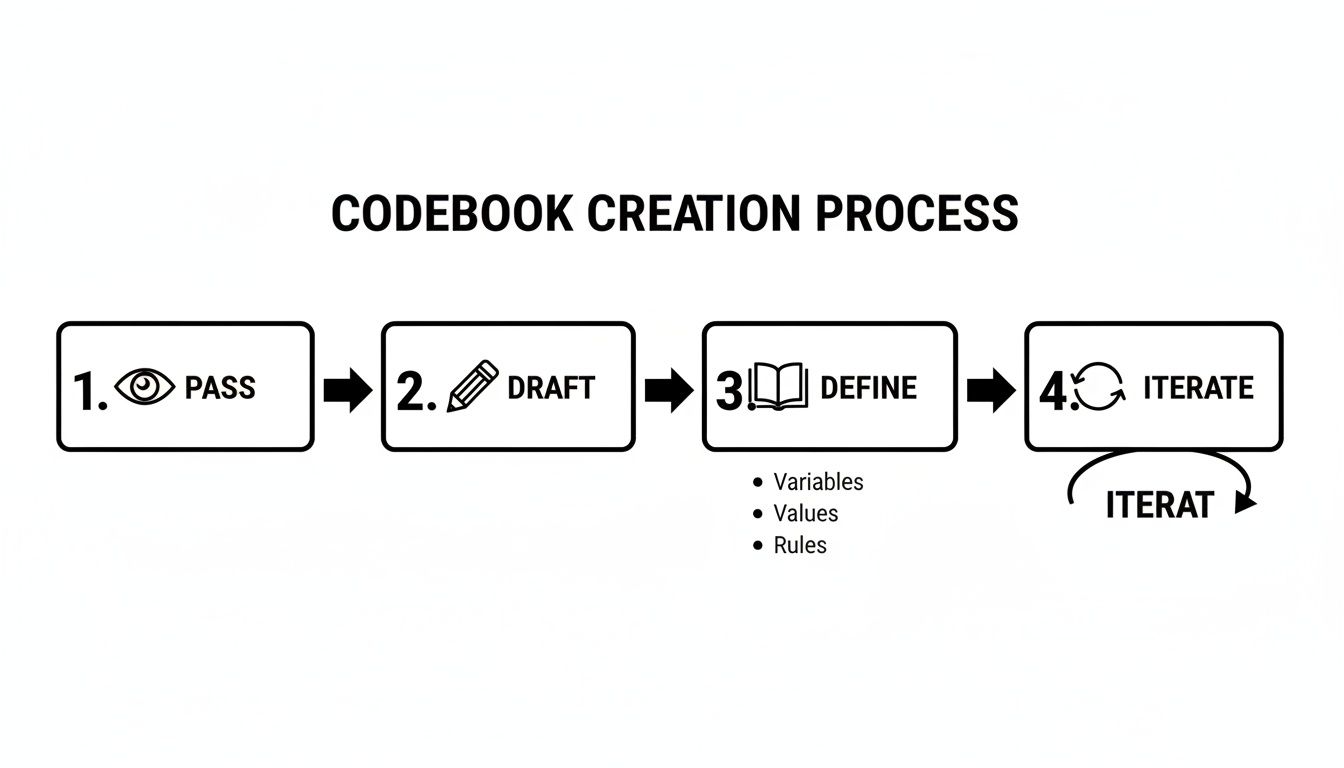
Once that foundation is in place, you can move into the actual coding.
Step 1: Data Immersion and Open Coding
Before you apply a single code, stop. Your first job is to simply read. Take a representative sample of your data—say, 10-20%—and just immerse yourself. The goal is pure absorption.
Once you have a feel for the data, you can begin open coding. This is the messy first pass. Go through your data line-by-line and create descriptive labels for anything that seems significant. Don't worry about creating the "perfect" code. Just tag what you see.
Example: Coding Churn Feedback
Imagine you're coding exit survey responses for a SaaS product. For the response, "I just couldn't figure out how to integrate my calendar, and the support docs were useless," you might create these initial open codes:
- Calendar Integration Failure
- Useless Documentation
- Setup Frustration
Step 2: Axial Coding (Finding Connections)
Now it’s time to bring order to the chaos. Axial coding is about taking those raw codes and grouping them into broader categories or "families." You're looking for connections.
This is where the bigger picture starts to emerge. You might notice that "Calendar Integration Failure," "Can't Connect to Slack," and "API Key Error" all fit under a broader category called "Integration Problems." Your goal is to shrink your initial list of dozens of codes into a more manageable set of 15-25 solid categories.
Step 3: Selective Coding (Identifying the Core Story)
This is the final phase. You’ve grouped your codes; now you have to identify the core theme that ties everything together. Selective coding is about finding the central story in your data. What is the one big idea or problem that all your other categories point to?
Finishing the churn analysis:
Looking at your categories—Technical Barriers, Poor Self-Service Support, Confusing UI, and High Price—you realize they all orbit a central problem. The core theme isn't just that the product is buggy; it's that "Users feel abandoned during complex setup." They hit technical walls and can’t find the help they need to get past them.
Actionable Takeaway: Embrace the mess. Your first pass at coding will feel chaotic. The real insight comes from iteratively refining that chaos—grouping, connecting, and finding the central narrative.
Is Manual Coding Obsolete? How AI Changes the Game
Let's be real: for most businesses, manual coding doesn't scale. It’s slow, painstaking, and easy to get wrong. This is where modern tools, powered by AI and Natural Language Processing (NLP), are flipping the script.
AI platforms tackle the grunt work. They handle the initial open coding, figure out customer sentiment, and spot emerging themes across thousands of responses in minutes. This frees you up to jump straight to strategic thinking.

The Difference Is Night and Day
We’re not talking about a small improvement; the gap is massive. Imagine you have 200 in-depth user interview transcripts.
- Doing it by hand: A seasoned researcher could easily spend 80 hours poring over transcripts. That's two full workweeks.
- Using an AI tool: You upload the same data, and in less than 30 minutes, the platform spits out a detailed list of initial themes and sentiment scores.
AI doesn't give you the final answer, but it handles the most grueling part of the job almost instantly. For those wanting to get hands-on with the models that power these tools, it's worth exploring prompts with tools like the OpenAI Playground to understand how they "think."
No Magic Wands: The Pros and Cons
AI is an incredible assistant, not a mind reader. Be clear-eyed about what it does brilliantly and where it falls short.
| Strengths of AI Coding | Weaknesses of AI Coding |
|---|---|
| Incredible Speed | Can miss deep human context |
| Handles Massive Scale | Often stumbles on sarcasm & nuance |
| Unbiased Consistency | Always needs human review & validation |
| Finds Hidden Patterns | Initial setup and training can be tricky |
The growth here is explosive. 2023 industry reports show AI-driven coding has slashed analysis time by up to 70%. This trend is accelerating, with some analysts predicting a 40% adoption rate for AI in qualitative research by 2025.
Actionable Takeaway: Think of AI as your first-pass analyst. Let it handle the first 80% of the work—initial sorting, tagging, and pattern spotting. Focus your expertise on the critical 20% of nuanced, strategic interpretation that only a human can deliver. Check out our guide on the best qualitative analysis software to find a tool for this workflow.
Common Pitfalls and How to Dodge Them
Experience is just a fancy word for learning from mistakes. Here are the fastest ways qualitative coding projects go off the rails. Getting this wrong doesn't just waste time; it produces dangerously misleading insights that can sink a product.
The Siren Song of Confirmation Bias
This is the big one. Confirmation bias is our natural tendency to hunt for data that confirms what we already believe. You become a detective who has already decided on the culprit and only looks for clues that fit that narrative.
Example: A product team was convinced their new feature was brilliant. They coded every piece of positive feedback in incredible detail but lumped all negative comments into a vague "User Confusion" bucket. They launched the feature and watched it flop. The warnings were right there in the data, but they chose not to see them.
Over-Coding Until You Drown
Another classic mistake is getting too granular. Over-coding happens when you create so many different codes that you can't see the forest for the trees. Instead of simplifying the data, you’ve created a one-to-one index for every sentence.
A good rule of thumb: if you have more codes than you have interview participants, that’s a red flag. The goal is to find patterns, not to paraphrase your entire dataset into a tag cloud.
The Danger of Drifting Definitions
Inconsistent coding happens when your code definitions are too loose, allowing their meaning to "drift" over a project or between researchers. A code for "Poor UI" might mean one thing on Monday and something slightly different by Friday. This silent corruption of your data makes any final summary unreliable. The shift to online qualitative research since 2020 has made this a bigger issue for remote teams. If you're interested in how teams are navigating these challenges, you can learn more about trends in qualitative research.
Actionable Takeaway: Before you start coding, run a "pre-mortem." Get your team together and ask: "If this project fails, what is the most likely reason?" This forces everyone to anticipate biases and sloppy habits before they poison the analysis.
FAQ: Your Qualitative Coding Questions, Answered
What’s the difference between a code and a theme?
Codes are the small, specific labels you assign to individual pieces of data (e.g., "login issue," "confusing UI"). They are the raw tags. Themes are the bigger story you uncover by grouping related codes together (e.g., "User Onboarding Friction"). Codes are the bricks; themes are the walls you build.
How many codes are too many?
There's no magic number, but a good rule of thumb is to aim for around 30-50 initial open codes. From there, your goal is to consolidate them into 5-10 major themes. If you find yourself with over 100 codes for 20 interviews, you’re likely paraphrasing the data, not analyzing it. You've lost the plot.
Can I just use Excel or Google Sheets for this?
Technically, yes, for a tiny project (under 50 responses). But it becomes brutally inefficient for anything more substantial. You'll spend more time fighting the spreadsheet than you will on analysis. For any real volume of feedback, dedicated software or an AI platform is purpose-built for this. Don't bring a knife to a gunfight.
What are the main types of qualitative coding?
The three big ones are Inductive coding (starting from scratch, letting themes emerge), Deductive coding (starting with a predefined list of codes to test a hypothesis), and Hybrid coding (a practical mix of both).
How do I ensure coding consistency with a team?
Your codebook is your single source of truth. It must have crystal-clear definitions and examples for each code. Before starting, have two people code the same small data sample and compare results. Discuss every disagreement and refine the codebook until you reach at least 80% agreement.
If you’ve got more than 20 open-ended responses, stop suffering—Backsy.ai scores them in minutes.
